

Running an Amaru Node on Preprod (Fast-Forward)
This is the fast path to a synced Amaru node: install the binary, bootstrap from a snapshot, and start it on preprod.
1. Hardware requirements
Section titled “1. Hardware requirements”| Network | CPU Cores | Free RAM | Free storage |
|---|---|---|---|
| Mainnet | 2 | 4GB | 30GB |
| Preprod | 2 | 2GB | 10GB |
2. Installing Amaru
Section titled “2. Installing Amaru”Pick whichever method fits your environment:
Release Binaries — pre-compiled executables
Statically-linked executables for Linux, macOS, and Windows, with shell completion scripts, are attached to every release and nightly build. Download the archive for your platform and put the amaru binary on your $PATH.
Debian / RPM package — create amaru user and systemd service
Also installs a dedicated system user and a systemd service, it’s the recommended path for a production deployment; see Installing Amaru in the mainnet guide.
Debian/Ubuntu:
VERSION=10.11.20260827 ARCH=x86_64  # check releases page for latest; also available for aarch64
curl -fsSL -o amaru-$VERSION-linux-$ARCH.deb "https://github.com/pragma-org/amaru/releases/download/v$VERSION/amaru-$VERSION-linux-$ARCH.deb"
sudo apt install ./amaru-$VERSION-linux-$ARCH.deb
Fedora/RHEL/CentOS:
VERSION=10.11.20260827 ARCH=x86_64  # check releases page for latest; also available for aarch64
curl -fsSL -o amaru-$VERSION-linux-$ARCH.rpm "https://github.com/pragma-org/amaru/releases/download/v$VERSION/amaru-$VERSION-linux-$ARCH.rpm"
sudo dnf install ./amaru-$VERSION-linux-$ARCH.rpm
Docker image
docker pull ghcr.io/pragma-org/amaru:latestMulti-arch (amd64/arm64), published on every change to main (:latest, a nightly build) and for tagged releases. See the package page for all tags.
Homebrew (macOS & Linux)
brew tap pragma-org/amaru https://github.com/pragma-org/amaru && brew trust --tap pragma-org/amaru
brew install amaru
Nix (macOS & Linux)
nix profile install --no-write-lock-file github:pragma-org/amaru#amaruBuild from source
Install a Rust toolchain (edition 2024, Rust 1.97 or newer, see rustup), then from a clone of the amaru repository:
cargo build --releaseThe binary is produced at target/release/amaru. Amaru also provides a Docker-based build and run path, see docker/README.md in the repository.
3. Bootstrapping the node
Section titled “3. Bootstrapping the node”Create a directory for your chosen network :
mkdir -p $HOME/amaru/preprod/
cd $HOME/amaru/preprod
Amaru bootstraps itself with Mithril-derived snapshots :
amaru node bootstrap --network preprodThis downloads a window of pre-generated Mithril-derived ledger snapshots from Amaru’s snapshot bucket and imports them directly into the chain and ledger databases.
amaru node run then only needs to sync the blocks produced since then.
$HOME/amaru/preprod/
├── chain.preprod.db/
├── ledger.preprod.db/
└── snapshots/4. Running the node
Section titled “4. Running the node”amaru node run --network preprod| Flag | Description |
|---|---|
--network | Network to run on: mainnet, preprod, preview, or a custom testnet_<magic> |
--db-chain | Directory for the chain database (defaults to ./chain.<network>.db) |
--db-ledger | Directory for the ledger database (defaults to ./ledger.<network>.db) |
--peers-listen-on | Address to accept incoming peer connections on (default 0.0.0.0:3000) |
--peer | Upstream peer(s) to sync from; repeatable or comma-separated |
--peers-max-upstream | Maximum number of upstream (outbound) peers Amaru maintains at once (default 3) |
--submit-api-listen-on | If set, exposes an HTTP POST /api/submit/tx endpoint for transaction submission |
For the full list of options run amaru node run --help.
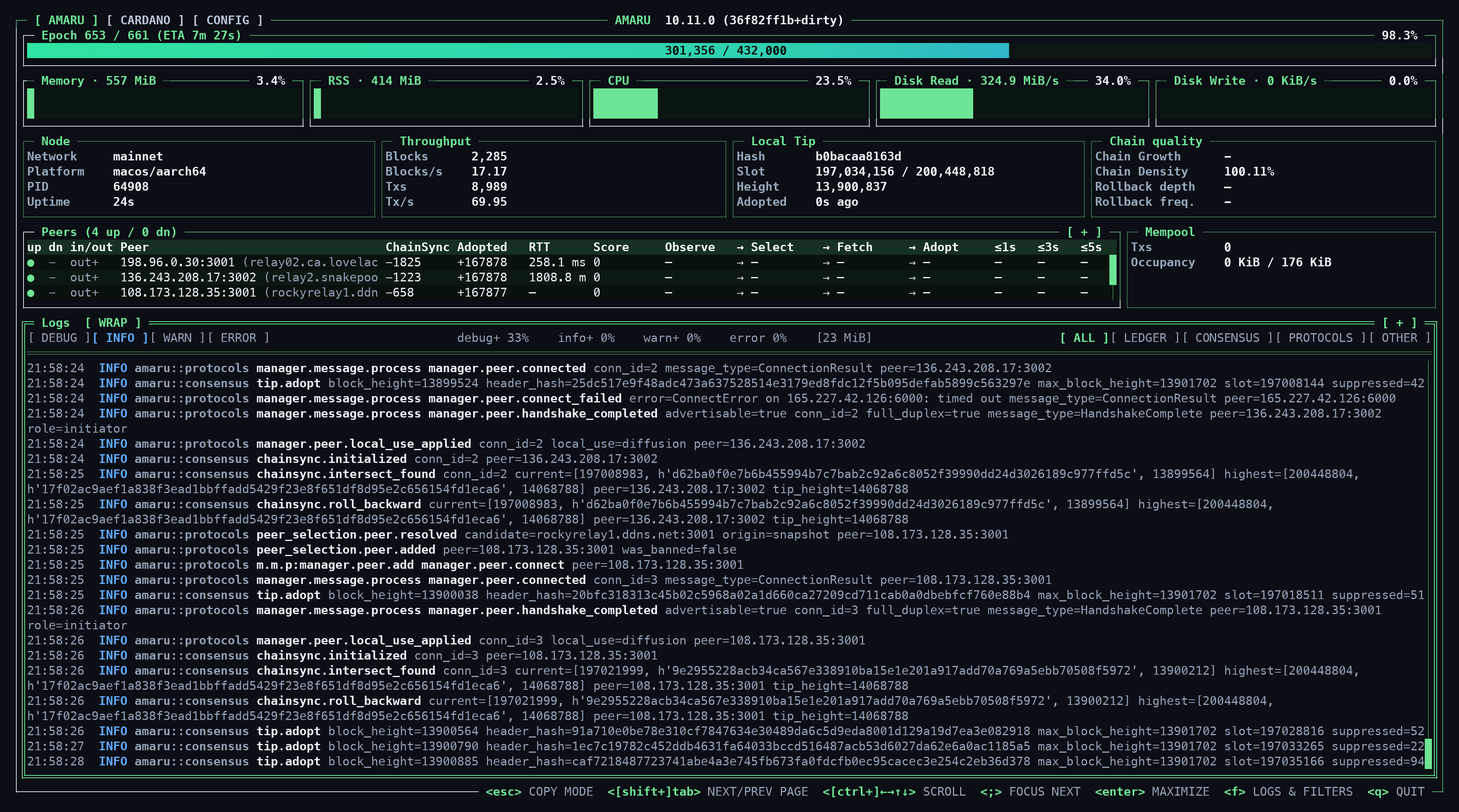
Unless --tui-off is passed (or stdout isn’t a terminal), amaru node run opens an embedded terminal dashboard showing sync progress, peers, and logs live, that’s the quickest way to confirm the node is catching up to the tip. See The Amaru TUI for a full tour of what it shows.
For OpenTelemetry metrics/logs/traces, Monitoring dashboards, submitting transactions, upgrading, and other operational details, see Advanced Installation in the mainnet guide.