

Running an Amaru Node on Mainnet: Advanced Installation
This page covers installing the binary, running it as a systemd service under its own dedicated system user, and the ongoing operation and maintenance of that deployment. It assumes the host has already been hardened, see System Hardening first if you haven’t done that yet.
1. Installing Amaru as a systemd service
Section titled “1. Installing Amaru as a systemd service”For production use, run amaru under systemd so it restarts automatically on failure or reboot.
The Debian / RPM package is the recommended path as it installs a dedicated amaru system user and the amaru.service unit for you.
Debian / RPM package — recommended for systemd deployments
Debian/Ubuntu:
VERSION=10.11.20260827 ARCH=x86_64  # check releases page for latest; also available for aarch64
curl -fsSL -o amaru-$VERSION-linux-$ARCH.deb "https://github.com/pragma-org/amaru/releases/download/v$VERSION/amaru-$VERSION-linux-$ARCH.deb"
sudo apt install ./amaru-$VERSION-linux-$ARCH.deb
Fedora/RHEL/CentOS:
VERSION=10.11.20260827 ARCH=x86_64  # check releases page for latest; also available for aarch64
curl -fsSL -o amaru-$VERSION-linux-$ARCH.rpm "https://github.com/pragma-org/amaru/releases/download/v$VERSION/amaru-$VERSION-linux-$ARCH.rpm"
sudo dnf install ./amaru-$VERSION-linux-$ARCH.rpm
Running Amaru as a systemd service
Section titled “Running Amaru as a systemd service”The Debian and RPM packages don’t just ship the amaru binary, they also install a dedicated amaru system user, a systemd unit, and a default environment file.
The systemd unit (Debian)
Section titled “The systemd unit (Debian)”amaruuser’s home is under/var/lib/amaruwithnologinamaru.serviceis installed at/usr/lib/systemd/system/amaru.servicebut not enabled or started.amaru-bootstrap.serviceis installed at/usr/lib/systemd/system/amaru-bootstrap.servicebut not enabled or started.amaru.envis installed as/etc/default/amaru
AMARU_NETWORK=mainnet
AMARU_DB_CHAIN=/var/lib/amaru/chain.mainnet.db
AMARU_DB_LEDGER=/var/lib/amaru/ledger.mainnet.db
AMARU_DB_CHAIN_AUTOMATIC_MIGRATION=true
AMARU_PID_EXPORT=/run/amaru/amaru.pid
AMARU_WITH_JSON_TRACES=true
2. Bootstrapping the node
Section titled “2. Bootstrapping the node”Assuming you are using the default db location:
cd /var/lib/amaruAmaru bootstraps itself with Mithril-derived snapshots:
sudo -u amaru amaru node bootstrap --network mainnetAlternatively, you can also run the one-shot bootstrap service:
sudo systemctl enable --now amaru-bootstrap.service
sudo systemctl start amaru-bootstrap
This downloads a window of pre-generated, Mithril-derived ledger snapshots from Amaru’s snapshot bucket and imports them directly into the chain and ledger databases.
amaru node run then only needs to sync the blocks produced since then.
/var/lib/amaru/
├── chain.mainnet.db/
├── ledger.mainnet.db/
└── snapshots/If you want to start from a specific epoch instead of the latest available snapshot:
sudo -u amaru amaru node bootstrap --network mainnet --epoch 6023. Configuring the node
Section titled “3. Configuring the node”You can override the defaults in /etc/default/amaru or add new one as needed.
Every amaru node run flag has a matching AMARU_* environment variable, for example:
[...]
AMARU_PEER=my-own-peer.example.com:3001
AMARU_PEERS_LISTEN_ON=0.0.0.0:3001
AMARU_PEERS_MAX_UPSTREAM=10
AMARU_WITH_OPEN_TELEMETRY=true
OTEL_METRIC_EXPORT_INTERVAL=1000You can get the full config list with the TUI under the config menu (press ESC on the Config page to enter copy mode and select values with the terminal):
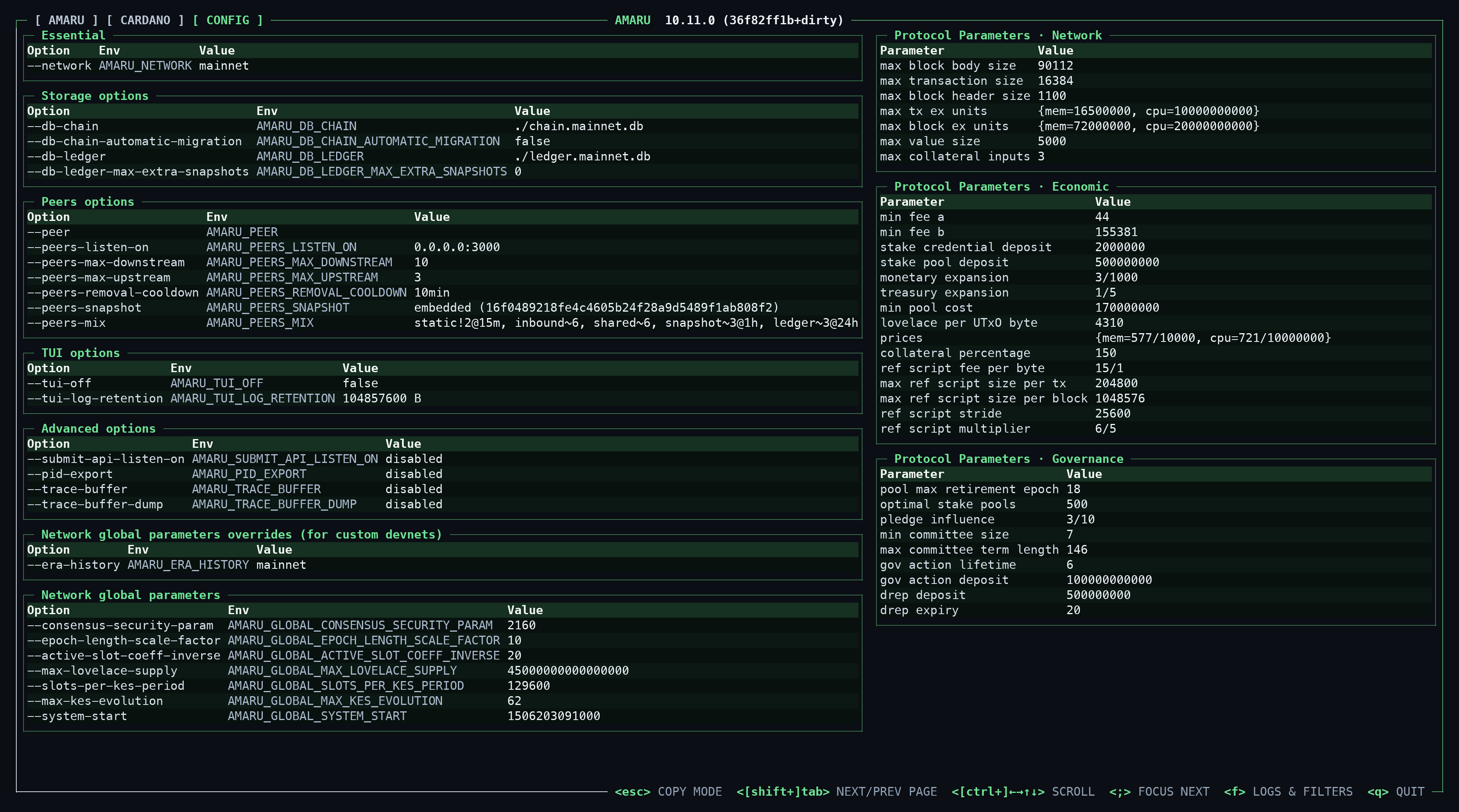
Here is the same config list in txt
┌─ [ AMARU ] [ CARDANO ] [ CONFIG ] ───────────────────────────────────────────────────────────────────────────────── COPY MODE ────────────────────────────────────────────────────────────────────────────────────────────────────────────────┐
│┌─ Essential ────────────────────────────────────────────────────────────────────────────────────────────────────────────────────────────────────┐┌─ Protocol Parameters · Network ─────────────────────────────────────────────────────────────┐│
││Option Env Value ││Parameter Value ││
││--network AMARU_NETWORK mainnet ││max block body size 90112 ││
│└────────────────────────────────────────────────────────────────────────────────────────────────────────────────────────────────────────────────┘│max transaction size 16384 ││
│┌─ Storage options ──────────────────────────────────────────────────────────────────────────────────────────────────────────────────────────────┐│max block header size 1100 ││
││Option Env Value ││max tx ex units {mem=16500000, cpu=10000000000} ││
││--db-chain AMARU_DB_CHAIN ./chain.mainnet.db ││max block ex units {mem=72000000, cpu=20000000000} ││
││--db-chain-automatic-migration AMARU_DB_CHAIN_AUTOMATIC_MIGRATION false ││max value size 5000 ││
││--db-ledger AMARU_DB_LEDGER ./ledger.mainnet.db ││max collateral inputs 3 ││
││--db-ledger-max-extra-snapshots AMARU_DB_LEDGER_MAX_EXTRA_SNAPSHOTS 0 │└─────────────────────────────────────────────────────────────────────────────────────────────┘│
│└────────────────────────────────────────────────────────────────────────────────────────────────────────────────────────────────────────────────┘┌─ Protocol Parameters · Economic ────────────────────────────────────────────────────────────┐│
│┌─ Peers options ────────────────────────────────────────────────────────────────────────────────────────────────────────────────────────────────┐│Parameter Value ││
││Option Env Value ││min fee a 44 ││
││--peer AMARU_PEER ││min fee b 155381 ││
││--peers-listen-on AMARU_PEERS_LISTEN_ON 0.0.0.0:3000 ││stake credential deposit 2000000 ││
││--peers-max-downstream AMARU_PEERS_MAX_DOWNSTREAM 10 ││stake pool deposit 500000000 ││
││--peers-max-upstream AMARU_PEERS_MAX_UPSTREAM 3 ││monetary expansion 3/1000 ││
││--peers-removal-cooldown AMARU_PEERS_REMOVAL_COOLDOWN 10min ││treasury expansion 1/5 ││
││--peers-snapshot AMARU_PEERS_SNAPSHOT embedded (16f0489218fe4c4605b24f28a9d5489f1ab808f2) ││min pool cost 170000000 ││
││--peers-mix AMARU_PEERS_MIX static!2@15m, inbound~6, shared~6, snapshot~3@1h, ledger~3@24h ││lovelace per UTxO byte 4310 ││
│└────────────────────────────────────────────────────────────────────────────────────────────────────────────────────────────────────────────────┘│prices {mem=577/10000, cpu=721/10000000} ││
│┌─ TUI options ──────────────────────────────────────────────────────────────────────────────────────────────────────────────────────────────────┐│collateral percentage 150 ││
││Option Env Value ││ref script fee per byte 15/1 ││
││--tui-off AMARU_TUI_OFF false ││max ref script size per tx 204800 ││
││--tui-log-retention AMARU_TUI_LOG_RETENTION 104857600 B ││max ref script size per block 1048576 ││
│└────────────────────────────────────────────────────────────────────────────────────────────────────────────────────────────────────────────────┘│ref script stride 25600 ││
│┌─ Advanced options ─────────────────────────────────────────────────────────────────────────────────────────────────────────────────────────────┐│ref script multiplier 6/5 ││
││Option Env Value │└─────────────────────────────────────────────────────────────────────────────────────────────┘│
││--submit-api-listen-on AMARU_SUBMIT_API_LISTEN_ON disabled │┌─ Protocol Parameters · Governance ──────────────────────────────────────────────────────────┐│
││--pid-export AMARU_PID_EXPORT disabled ││Parameter Value ││
││--trace-buffer AMARU_TRACE_BUFFER disabled ││pool max retirement epoch 18 ││
││--trace-buffer-dump AMARU_TRACE_BUFFER_DUMP disabled ││optimal stake pools 500 ││
│└────────────────────────────────────────────────────────────────────────────────────────────────────────────────────────────────────────────────┘│pledge influence 3/10 ││
│┌─ Network global parameters overrides (for custom devnets) ─────────────────────────────────────────────────────────────────────────────────────┐│min committee size 7 ││
││Option Env Value ││max committee term length 146 ││
││--era-history AMARU_ERA_HISTORY mainnet ││gov action lifetime 6 ││
│└────────────────────────────────────────────────────────────────────────────────────────────────────────────────────────────────────────────────┘│gov action deposit 100000000000 ││
│┌─ Network global parameters ────────────────────────────────────────────────────────────────────────────────────────────────────────────────────┐│drep deposit 500000000 ││
││Option Env Value ││drep expiry 20 ││
││--consensus-security-param AMARU_GLOBAL_CONSENSUS_SECURITY_PARAM 2160 │└─────────────────────────────────────────────────────────────────────────────────────────────┘│
││--epoch-length-scale-factor AMARU_GLOBAL_EPOCH_LENGTH_SCALE_FACTOR 10 │ │
││--active-slot-coeff-inverse AMARU_GLOBAL_ACTIVE_SLOT_COEFF_INVERSE 20 │ │
││--max-lovelace-supply AMARU_GLOBAL_MAX_LOVELACE_SUPPLY 45000000000000000 │ │
││--slots-per-kes-period AMARU_GLOBAL_SLOTS_PER_KES_PERIOD 129600 │ │
││--max-kes-evolution AMARU_GLOBAL_MAX_KES_EVOLUTION 62 │ │
││--system-start AMARU_GLOBAL_SYSTEM_START 1506203091000 │ │
│└────────────────────────────────────────────────────────────────────────────────────────────────────────────────────────────────────────────────┘ │
│ │
└───────────────────────────────────────────────────────────────────────────────────────────────────────────────────────────────────────────────────────────────────────────────────────────────────────────────────────────── <esc> NORMAL MODE ─┘4. Running the node as a systemd service
Section titled “4. Running the node as a systemd service”The amaru.service is not enabled by default, enable it so it can restart on failure or reboot :
sudo systemctl enable amaru.service
sudo systemctl start amaru
You can then read Amaru logs with journalctl -fu amaru
5. Logs, Metrics and Monitoring
Section titled “5. Logs, Metrics and Monitoring”Amaru uses OpenTelemetry to export its Metrics, Logs and Traces.
When running Amaru in CLI use --with-open-telemetry:
amaru --with-open-telemetry node run --network preprodWhen running Amaru as a systemd service set the env variable AMARU_WITH_OPEN_TELEMETRY:
AMARU_WITH_OPEN_TELEMETRY=true
OTEL_METRIC_EXPORT_INTERVAL=1000A complete Monitoring stack is available in the Amaru repository
After cloning the repo, run :
docker compose -f monitoring/docker-compose.yml up -dThe stack includes:
- OpenTelemetry Collector on localhost:4317 (OTLP/gRPC)
- Tempo for spans and span-derived metrics
- Prometheus for application and span-derived metrics
- Loki for OpenTelemetry logs and their structured metadata
- Grafana with all three data sources provisioned and trace-to-log correlation enabled
See all details in the Amaru Monitoring Readme
6. Administration & maintenance
Section titled “6. Administration & maintenance”Submitting a transaction
Section titled “Submitting a transaction”Start the node with --submit-api-listen-on or AMARU_SUBMIT_API_LISTEN_ON, then POST the CBOR-encoded transaction:
curl -X POST \
  --header "Content-Type: application/cbor" \
  --data-binary @tx.cbor \
  http://localhost:8090/api/submit/tx
See Amaru Submit API documentation for additional details.
Upgrading Amaru
Section titled “Upgrading Amaru”Amaru is still in an exploratory phase, so check the release notes before every upgrade.
- Release Binaries — replace the
amarubinary on your$PATHand restart the process. - Debian/RPM package — download and install the new package the same way as the initial install.
run
systemctl restart amaru.serviceafterwards. - Docker — pull the new tag and recreate the container.
- Homebrew / Nix —
brew upgrade amaru/ re-run thenix profile installcommand with the new ref.